Smart home technology is rapidly transforming how we live, and one of the most popular innovations is the smart lock. A smart lock provides convenience, security, and peace of mind, especially when it comes to protecting your front door, the primary entry point to your home. With keyless entry, remote locking, and monitoring features, smart locks are becoming an essential part of modern home security systems.
In this article, we will guide you through everything you need to know about the best smart locks for front doors. We’ll discuss key features to look for, considerations when choosing a smart lock, and the top benefits of using a smart lock for your front door. By the end, you’ll be equipped to make an informed decision about which smart lock suits your security needs.
1. What is a Smart Lock?
A smart lock is a keyless entry system that allows you to lock or unlock your door using a smartphone, key fob, voice assistant, or other digital means, instead of relying on traditional mechanical keys. These locks are electronically controlled and often connect to your home’s Wi-Fi or Bluetooth system for remote operation.
Key Features of Smart Locks
Keyless Entry: No need for traditional keys. Unlock your door using your smartphone or biometric data (fingerprint, face recognition).
Remote Control: Lock or unlock your door from anywhere using a smartphone app or web portal.
Security Alerts: Get real-time notifications if someone enters or attempts to tamper with your door.
Access Control: Grant access to family members, friends, or service providers with temporary codes or app access.
Integration with Smart Home Systems: Sync your lock with other smart devices like security cameras, alarms, and smart lighting for enhanced home automation.
2. Key Features to Look for in a Smart Lock for Your Front Door
When choosing the best smart lock for your front door, there are several important features that you should consider. The following table outlines the critical aspects you should evaluate:
Feature | What to Look For | Why It’s Important |
Security Features | - Encryption standards like AES 128 or 256 bits
- Anti-tampering and alarm systems | To ensure the lock can withstand hacking attempts and unauthorized access attempts. |
Connectivity Options | - Wi-Fi
- Bluetooth
- Z-Wave or Zigbee compatibility | Compatibility with your home’s network ensures seamless operation and remote access. |
User Access & Permissions | - Fingerprint recognition
- Key codes
- Temporary access codes | To grant different levels of access for family, guests, or service providers, enhancing convenience. |
Battery Life & Power | - Long-lasting rechargeable batteries
- Backup power options like physical key override | Battery life and backup power ensure the lock operates smoothly even during power outages or low battery conditions. |
Integration with Other Devices | - Compatibility with Amazon Alexa, Google Assistant, or Apple HomeKit | Integration with other smart devices makes your home automation system more efficient and user-friendly. |
Security Features
The security features of a smart lock are paramount, especially for a front door. Most modern smart locks use AES 128-bit encryption or AES 256-bit encryption, which are highly secure and resistant to hacking attempts. Additionally, many smart locks are equipped with anti-tampering features, such as alarms that sound off if someone tries to forcibly unlock or tamper with the lock. These features provide peace of mind and help protect your home from intruders.
3. Top Considerations When Choosing a Smart Lock for Your Front Door
While security is a top priority, there are other factors to consider when selecting a smart lock for your front door. These factors ensure that the lock will not only keep your home secure but also provide convenience and ease of use.
Compatibility with Door Types
Smart locks come in a variety of styles, including deadbolt locks, handle locks, and mortise locks. It’s important to choose a smart lock that is compatible with your front door type. Make sure the lock fits securely in the existing mounting holes of your door to avoid any unnecessary alterations.
Installation Process
Some smart locks can be easily installed with basic tools, while others may require professional installation. Look for a lock that is DIY-friendly if you prefer to install it yourself, or choose one that comes with professional installation services if you need assistance.
Weather Resistance
Since your front door is exposed to various weather conditions, it’s crucial that your smart lock is durable and weather-resistant. Ensure that the lock is rated to withstand extreme temperatures, rain, and humidity.
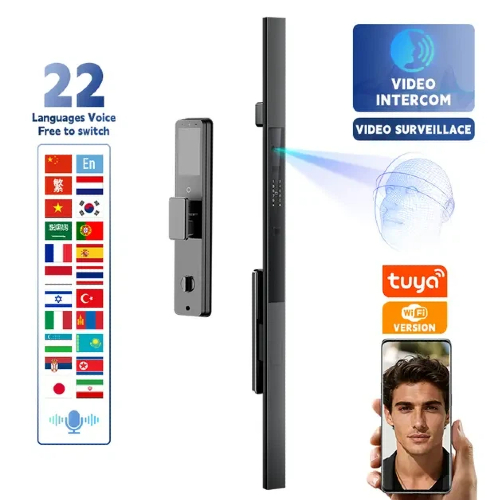
4. How to Set Up and Use a Smart Lock for Front Doors
Setting up a smart lock on your front door is typically a straightforward process, although it may vary depending on the model. Below is a general step-by-step guide for installing and using a smart lock.
Step 1: Prepare Your Door
Before installing your smart lock, ensure that your door is properly aligned and that it can accommodate the type of smart lock you’re purchasing. Remove the old lock and clean the door surface for a smooth installation.
Step 2: Install the Lock Mechanism
Follow the manufacturer’s instructions to install the lock mechanism. This usually involves placing the smart lock’s deadbolt or handle into the door, securing it with screws, and attaching the lock’s electronic components.
Step 3: Connect the Lock to the App
Download the accompanying app for your smart lock and pair it with the lock. The app will guide you through the process of connecting the lock to your home’s Wi-Fi or Bluetooth system.
Step 4: Customize User Access
Set up access codes, fingerprints, or face recognition data for your family members, friends, or other trusted individuals. This ensures that everyone can enter the home securely and conveniently.
Step 5: Test the Lock
Test the lock to make sure it’s functioning properly. Try locking and unlocking it remotely using your smartphone or smart assistant.
5. Why Smart Locks Are the Best Option for Front Door Security
Smart locks are one of the best ways to enhance the security of your front door. Here are the top benefits of choosing a smart lock for your home:
Enhanced Security: Smart locks use advanced encryption and multiple access methods to prevent unauthorized entry. Additionally, features like tamper alerts and automatic locking enhance overall security.
Convenience: Say goodbye to lost or forgotten keys! Smart locks offer keyless entry through your smartphone, biometric data, or temporary access codes.
Remote Monitoring: You can monitor the status of your front door lock remotely, which provides peace of mind when you’re not at home. Receive alerts when someone enters or exits.
Integration with Smart Home Devices: Smart locks seamlessly integrate with other devices in your smart home ecosystem, such as cameras, alarms, and voice assistants, creating a more efficient and secure home.
6. Conclusion
Choosing the best smart lock for your front door is crucial for enhancing both the security and convenience of your home. With state-of-the-art security features, remote control capabilities, and straightforward installation, smart locks offer an ideal solution for modern households. When selecting a smart lock, it’s important to consider factors such as compatibility with your door type, user access control options, and seamless integration with your home automation system.
By investing in a high-quality smart lock, you’re not only securing your front door but also strengthening your home’s overall security infrastructure. At Zhongshan Xiangfeng Intelligent Technology Co., Ltd., we specialize in cutting-edge smart lock solutions designed to meet your needs. Our products offer top-notch security and ease of use, making them perfect for both residential and commercial applications.
If you’re looking to upgrade your home security with a reliable smart lock, we encourage you to explore our range of products. Feel free to get in touch with us for more information or to find the perfect smart lock for your front door.
7. FAQ
1. How does a smart lock work for a front door?
Smart locks use electronic mechanisms to lock and unlock doors via Bluetooth, Wi-Fi, or other wireless technologies. They are controlled by smartphones, key fobs, or voice assistants, offering a convenient and secure way to access your home.
2. Are smart locks safe for front doors?
Yes, most smart locks come with advanced security features like encryption, tamper detection, and emergency lock overrides, making them safer than traditional locks.
3. Can I install a smart lock on any front door?
Most smart locks are compatible with standard deadbolts and handle locks, but it’s essential to check the specifications of the lock to ensure compatibility with your front door type.
4. How do I change the battery in my smart lock?
Most smart locks feature easily replaceable batteries and offer low battery warnings via the app. Typically, you simply need to replace the batteries without needing to disassemble the entire lock.
5. Can I control the smart lock remotely?
Yes, many smart locks allow you to control the lock remotely via an app on your smartphone, and some can be integrated with smart home assistants like Alexa or Google Assistant for voice-controlled access.


